Lead Capture
On This Page
We’re using an app called Orca Scan for lead capture at this year’s event. Attendee badges will have a QR code printed on the front of their badge. To save an attendee’s information, you’ll just need to scan their badge. Below is some information on how to get set up and use the app.
Set Up Orca Scan
Here are just a few steps to get set up:
- Accept the email invitation from hello@orcascan.com. You’ll be prompted to create an account.
- Download the Orca Scan Mobile App to your iPhone or Android device.
- Log into the app using the same username and password you created when you accepted the email invitation.
- Done! Now test Orca Scan using the steps below.
Test Orca Scan
Follow these steps to make sure that you’re set up up correctly:
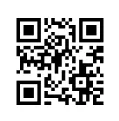
- Select the “SCAN” button at the bottom of the app, then scan the test QR code below.
- Once you’ve scanned the QR code you’ll see the test attendee’s data.
- Click on the Notes field and add some notes (optional).
- Select the “Save & Close” button.
- An attendee named Sasquatch Bigfoot should now be in your list of leads.
Add an Attendee Manually
Attendees who registered for the conference after May 24 will not have a QR code on their badge, but you can add them to your list manually. To do so, just select the + icon in the upper left hand corner of the app, click each field to enter the attendee’s information, and select the “Save & Close” button.
Tips
The Local tab in your Orca Scan app displays attendees scanned on your specific device, allowing for offline access to data. The Cloud tab shows all scans from every user and device connected to your Orca Scan sheet, providing a unified view of everyone your team scanned at CascadiaJS.
To export your data, select the Export button. You can do this on your mobile device or laptop. Data can be downloaded to Excel, CSV, and other formats.
Help
Having trouble using the app? Contact carrie@cascadiajs.com.
Our Sponsors










i always have a good time at @CascadiaJS. still one of my fave talks of all time there but more imptly the people and the vibe that @crtr0 and co create make you feel the JS community in a way that very very few are able to do.
— swyx (@swyx) August 14, 2025
join Sept 18-19 in Seattle! https://t.co/xoOT9pkMSl
I LOVE CascadiaJS. Incredible conference in a beautiful city with solid lineups, wonderful staff, and just the right amount of silly. Also @crtr0 at karaoke. 💙
— Josh Goldberg 🦋 (@JoshuaKGoldberg) June 22, 2024
Congrats & thanks again for such a wonderful time! https://t.co/3jhkI8O6Su
I 💚 CascadiaJS bc it feels like the cool, cult classic of JS events.
— Michelle Bakels (@MichelleBakels) March 28, 2025
It’s got everything — a dedicated fan base of 10+ years, close family vibes, long held traditions (the best karaoke!), sublime locale, and a flair for the atypical/creative conf sessions.
Def apply + attend! https://t.co/yqrEbh0icL
The reason why @CascadiaJS is one of my favorite conferences is because you can truly feel the passion and care that everyone puts into it. There's a real sense of community, it's amazing 🙌👏💜
— Charlie Gerard (@devdevcharlie) September 2, 2022
Once again, @CascadiaJS did not disappoint—I love that we have a community-focused conference right in the PNW. It's always inspiring to hear about what people are making, stretch my perspective, and meet new friends.
— Mark Palfreeman 🪐 (@markpalfreeman) September 3, 2022
Also Sunriver resort was awesome 🤘#CascadiaJS pic.twitter.com/SKlPeHibHE
On my way out of @CascadiaJS, feeling grateful for the work that @crtr0, his family, the staff and volunteers, sponsors, speakers, and all put into this family reunion.
— Tejas Kumar (@TejasKumar_) September 3, 2022
Some wonderful memories were made, and the combination of nature and lovely people made it so special. pic.twitter.com/F4JC0318pe
Wow, what a week at @CascadiaJS! Our team thoroughly enjoyed connecting with other engineers, learning from various talks, & experiencing beautiful Sunriver, OR. We wanted to thank everyone who helped organize this event; it was spectacular, and we cannot wait to be back in 2024. pic.twitter.com/vCO33rBTFa
— Formidable, Now Nearform (@FormidableLabs) September 6, 2022
I'm absolutely blown away by how much @cartwr and the entire team @CascadiaJS lifts up and highlights the people who contribute to and make this conference so special. This is what a conf that focuses on community looks like! 🌲 #cjs19 pic.twitter.com/Yh0CdOzVyx
— Divya (@shortdiv) November 9, 2019
I absolutely LOVED MCing @CascadiaJS! This was such a well organized conference, huge kudos to the speakers, the organizers, the sponsors, and of course the audience + community for making it great. It was a pleasure!! #cjs20 pic.twitter.com/EhqjhYJEVY
— Cassidy (@cassidoo) September 3, 2020
Attended #CascadiaJS last week! Awesome speakers/workshops and very well done virtual/hybrid experience! Can't recommend it enough for developers no matter where they are in their coding journey! 🖥️🌲#webdevelopment #javascript #CascadiaJS2021 #PNW pic.twitter.com/imknQzJmBZ
— Nathan Pickard (@NathanPickard) November 8, 2021
Had an amazing time at @CascadiaJS. See you next year! pic.twitter.com/eJYIkqHVMf
— Treasure Porth (@treasureporth) November 13, 2019
I was honored to participate in #CascadiaJS again this year. I've been so impressed again with all the creativity and effort the organizers, speakers, and community puts into making it a uniquely fun event. ✨ pic.twitter.com/x0byI4utED
— Nicole Oliver (@nixcodes) November 5, 2021
Yeah, tonight was great. #CascadiaJS pic.twitter.com/4hHgTP46fg
— Jessica West (@jessicaewest) November 5, 2021
Awesome @CascadiaJS afterparty at the @LivingComputers
— Welling Guzmán (@wellingguzman) November 17, 2018
I had so much fun. #CJS18 pic.twitter.com/xUiF2iupz6
I can't thank @crtr0, the @CascadiaJS team, and the conference sponsors enough for the opportunity to attend #cascadiajs! Everyone was so encouraging and welcoming, I'm thrilled to bring back what I learned to @MakeThinkCode & @pnca. pic.twitter.com/5hVyhcmyUL
— meganmckissack (@meganmckissack) November 19, 2018